Instashare 2 is live with powerful tools to enhance teaching flexibility
The latest Instashare 2 update introduces smart upgrades that make screen sharing and multi-display setups more intuitive than ever. Here’s what’s new and why you should consider rolling it out district-wide. Visit BenQ Service Genie for full release details.
🚀 New Feature Highlights
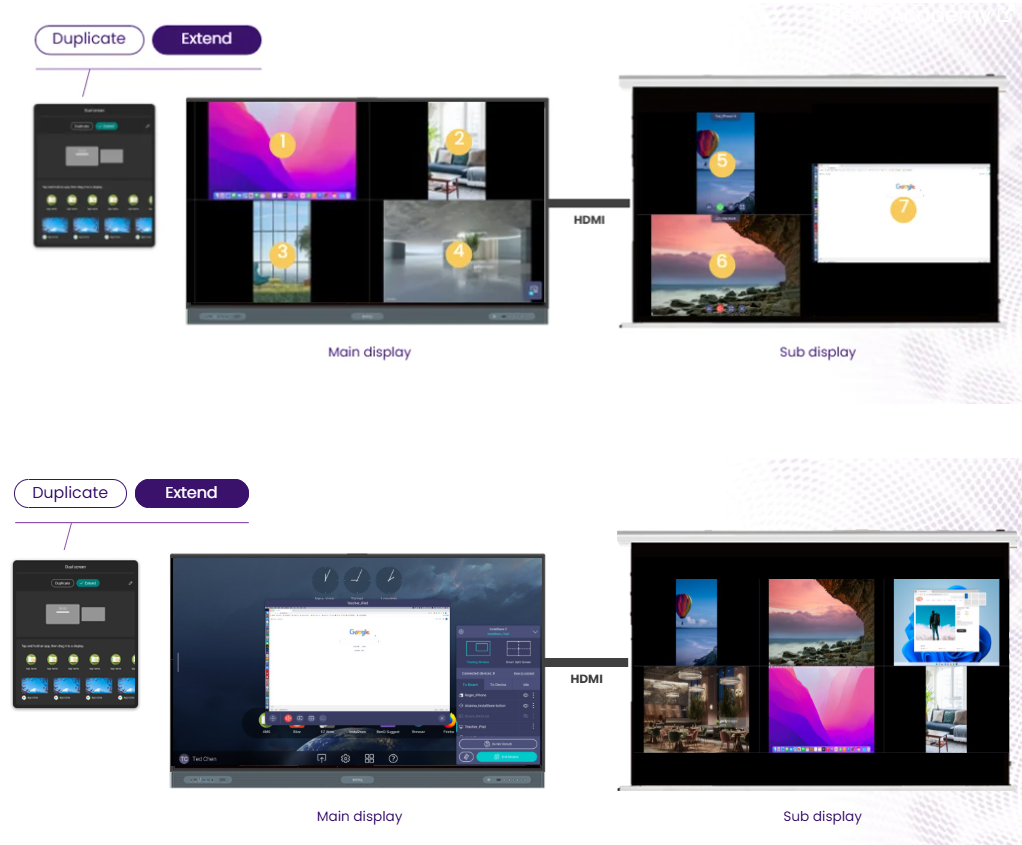
🖥️ Dual Screen (RP04 Series only)
Extend the classroom display experience Teachers can now connect a second screen and use it as anextended display. With Instashare 2, content can bemoved or sharedbetween the BenQ Board and the secondary display — perfect for dual-screen teaching, reference material, or media playback.
⭐ My Favorites
Easily find connected displays This new feature lets userspin preferred display as a favoriteto easily locate it at the top of the available display list, making it faster to identify and connect to familiar displays. To add a display as a favorite, tap the star icon at the top of the InstaShare 2 app Home screen after connecting to the display.
🪟 Adjustable Floating Window
Flexible On-screen Control.
The floating window can now bemoved and resized anywhereon the screen. This gives educators more control while keeping content in view without interruption.
IT Admin Tips:
All three features can be remotely deployed via DMS. We recommend enabling them across all BenQ Boards before the school year starts to maximize teacher adoption.





Comments
0 comments
Please sign in to leave a comment.